

Best Ticketing Software For Small IT Departments
Small IT teams deal with everything. From password resets to system issues, the workload is constant. Without a proper system, requests get lost, delayed, or handled twice. The right help desk software keeps everything in one place and helps your team respond faster without confusion.
What Small IT Teams Actually Need
Most tools are built for large teams. Small teams need something simpler.
Key needs for small IT departments:
Central place for all support requests
Clear ticket ownership and tracking
Basic automation to save time
Simple reporting for quick insights
Easy setup without long training
For teams working with SaaS products, help desk software for Saas should also support user-level tracking and quick issue tagging.
Best Ticketing Software Options:
Here are some tools that work well for small IT teams.
1. Freshdesk
Easy setup for small IT teams
Built-in automation for repetitive tickets
Simple interface with quick navigation
Free plan available for basic use
2. Zoho Desk
Good fit for growing IT teams
Strong ticket organization and tagging
Integrates well with other Zoho tools
Affordable pricing for small teams
3. Jira Service Management
Best for teams already using Jira
Strong issue tracking and workflows
Works well for technical environments
Slight learning curve for beginners
4. Spiceworks Help Desk
Free tool for small IT teams
Basic ticketing with simple features
Community support and resources
Limited advanced automation features
5. Freshservice
Built for internal IT support teams
Asset management is included in the system
Clean interface with structured workflows
Slightly higher pricing than basic tools
Quick Comparison Table
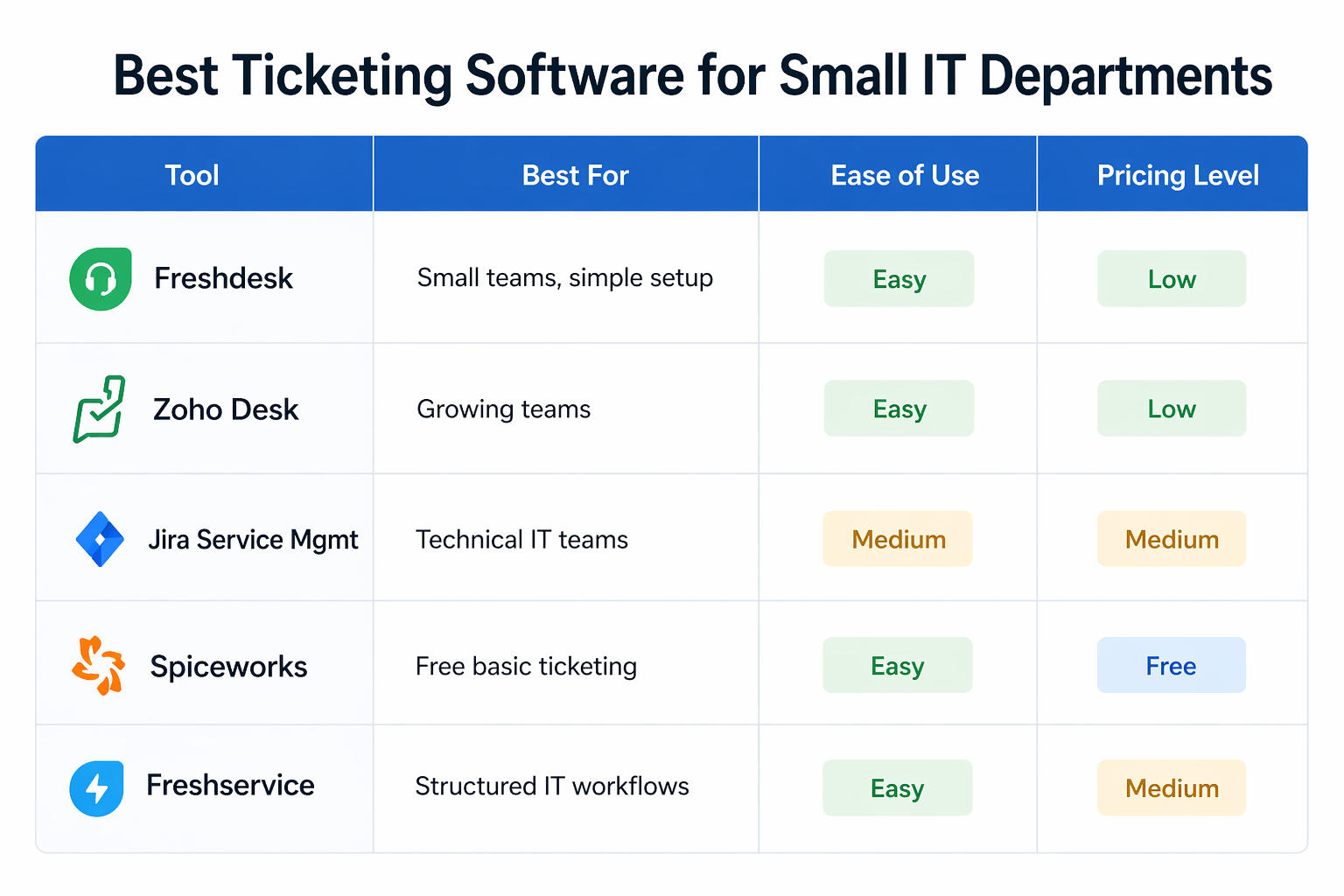
Here is a quick comparison of the most suitable ticketing tools for small IT departments:
Tool | Best For | Ease of Use | Pricing Level |
|---|---|---|---|
Freshdesk | Small teams, simple setup | Easy | Low |
Zoho Desk | Growing teams | Easy | Low |
Jira Service Management | Technical IT teams | Medium | Medium |
Spiceworks | Free basic ticketing | Easy | Free |
Freshservice | Structured IT workflows | Easy | Medium |
How to Choose the Right Tool?
Do not pick the tool based on brand name alone. Choose based on how your team works day to day.
What to check before choosing:
Tool matches your current workflow
The team can learn it quickly
Pricing fits your budget as you grow
Integrations work with your systems
Reporting gives useful basic insights
A good help desk software should reduce workload, not add more steps.
Features That Matter Most
Small IT teams do not need everything. They need to focus on what improves daily work.
Must-have features for small teams:
Simple ticket creation and tracking
Clear ownership for every request
Email to ticket conversion support
Basic automation for repeated issues
Dashboard for quick status overview
For help desk software for Saas teams, integration with product tools and user data becomes more important.
Frequently Asked Questions
What is the best ticketing software for small IT teams?
Freshdesk and Zoho Desk are strong choices because they are simple to use and offer enough features without making the system complex.
Is free ticketing software enough for small IT departments?
Yes, for basic needs. As your team grows, you may need better automation and reporting features.
How does help desk software improve IT support?
It organizes all requests, assigns ownership, and helps track response time, which improves overall efficiency.
What is the difference between ticketing software and help desk software?
Ticketing software focuses on managing requests, while help desk software includes automation, reporting, and integrations for full support workflows.
Which help desk software for Saas teams works best?
Tools that integrate with product data and allow user-level tracking work best for SaaS teams.
Related Posts

Key Help Desk Features For Finance Teams
Discover key help desk features for finance teams. Improve control, tracking, and compliance with the right setup while keeping workflows simple and efficient.
Why Help Desk Systems Fail After Implementation
Learn why help desk systems fail after implementation. Fix adoption issues, improve workflows, and track ROI to get better results from your support setup.